
Practice resource
Engineering Physics
Open the shared Google Drive resource for Engineering Physics.
Google DriveOpen resource ↗
A central place for JU Chemical Engineering Semester 1 notes, class routines, lecture links and important updates — built to make study resources easier to find.

Registration is expected to start from 15 October 2026, as shared in this student update. Please check the official university notices for confirmation and instructions.
Quick access to your resources, personal deadlines and study plan. Your personal tasks stay on this device.
Search subjects, lecture playlists, routine, notices and website sections.
Jump directly to frequently used sections.
Record test scores, set target percentages, and see your progress. No login required.
Add your own assignments, practicals, tests and submission dates. Items are saved locally in this browser on this device.
Privacy note: deadlines are stored in your browser only. They do not sync to other phones or computers and may be lost if browser data is cleared.
Set a daily study target and add topics you want to complete. Progress is saved locally on this device.
Add a topic or task to your personal study checklist.
Choose how much focused study time you want to aim for each day.
Tip: break a large chapter into small topics, then tick them off one by one. You can use this planner alongside the lecture playlists and your class routine.
Choose a lecture ↗Find notes and assignments here. Materials will be added when they are available.
Open the shared Google Drive resources for each Semester 1 subject.
Open the shared Google Drive resource for Engineering Physics.
Open the shared Google Drive resource for Engineering Drawing.
Open the shared Google Drive resource for Basic Electrical Engineering.
Open the shared Google Drive resource for Engineering Mathematics.
Open the shared Google Drive resource for Engineering Mechanics.
Open the shared Google Drive resource for Humanities and Sociology.
If a folder or file does not open, sign in to the Google account that has access or ask the resource owner to update sharing permissions.
Important notices for JU ChE'30 students.
Registration is expected to start from 15 October 2026, as shared in this student update. Confirm the date and process through the official university notice.
LATEST UPDATE · CHECK OFFICIAL NOTICEContact your Class Representative (CR) for further information.
IMPORTANT UPDATECheck the class WhatsApp group for daily notes and shared class materials.
IMPORTANT UPDATEHave useful notes, solved assignments, previous-year questions, or a useful study-resource link? Send the details directly to Amit by email. Resources will be reviewed before being added to the Study Materials library.
Include the resource title, subject, semester, and Google Drive link (if applicable). Make sure you have permission to share the material.
Email Amit ↗Contributions are reviewed before publication. This website does not accept direct PDF uploads.
Final routine for B.Ch.E. 1st Year, Odd Semester, Session 2026–2027.
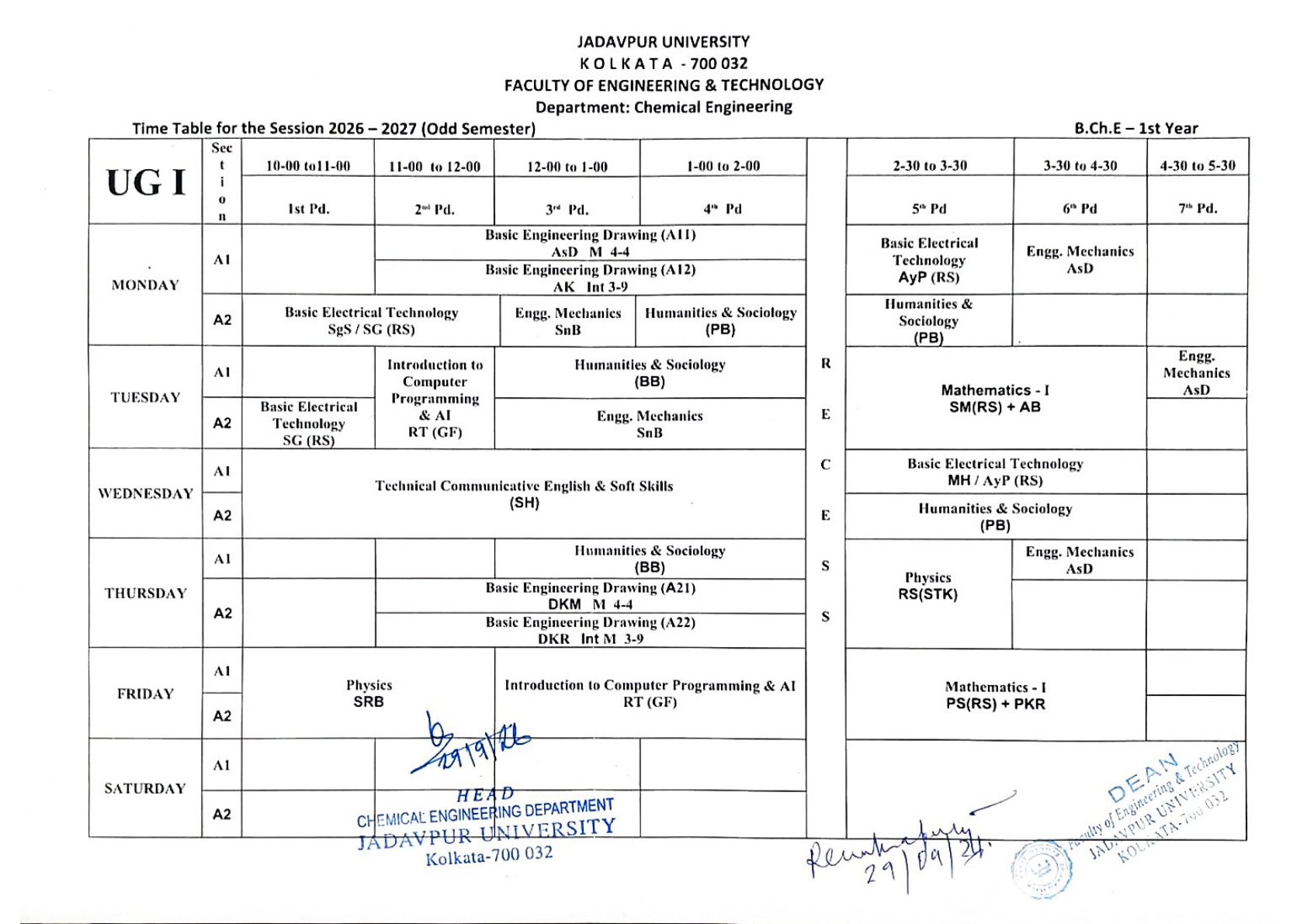
Subject-wise playlists selected for JU ChE'30 Semester 1. Open a playlist to study the topic.
A separate resource for building aptitude skills alongside your semester studies.
GATE Aptitude Preparation PlaylistOpen YouTube playlist↗Keep your class schedule and official curriculum documents close at hand.
Have useful notes, solved assignments, previous-year questions, or a well-organised Google Drive folder? Share it with classmates so everyone can learn together.
Email the material title, subject, semester, and resource link to the website developer. If using Google Drive, set access so the link can be opened by classmates. Share only material you are allowed to distribute.
Email Amit ↗Please do not upload private student information, paid copyrighted books without permission, or files you do not have the right to share. Contributions may be checked before being added to the website.
Useful academic contacts and ways to reach the website developer.
For official academic matters, verify details with the department and current university notices. Contact information is listed here for student convenience.
A student-powered space to ask doubts, share achievements, discuss ideas and help your classmates grow.
Ask a question, share an achievement, react with emojis, and comment helpfully on classmates’ posts.
Public posts from students
SoCheMedia is a student project, not an official Jadavpur University service. Names and posts are public; email addresses are kept private. Please do not share phone numbers, passwords, or sensitive personal details. Reactions and comments are public. This student project has basic automated checks but no full-time moderation.
Add semester exam dates, start times, end times, rooms, and reminders. Saved on this device.
Calendar entries are personal to this browser. Check official JU notices for confirmed dates.
Take a quick break with daily logic games. Play as many rounds as you like. Each new round generates a randomized challenge.
Solve the challenge before the timer runs out.
Games are playable locally; submitting scores requires the deployed Netlify leaderboard function.
Scores for the current 24-hour board. The board refreshes daily; only display names and points are public.
The website can show a genuinely shared leaderboard only when the backend is deployed. The two-attempt limit is enforced on this device and should not be treated as cheat-proof without server-side identity controls.
A keyboard-friendly scientific calculator for everyday engineering calculations. Follow your exam's rules about permitted calculators.
Supports arithmetic, powers, square roots, logarithms, trigonometry, factorials and DEG/RAD modes. This is a study tool, not a certified examination calculator.
The purpose of this website is to help you find study materials, lectures, and notes in one convenient place. Students often spend a lot of time searching in different places for the right lectures and resources. Study Hub was created to make it easier for every JU ChE'30 student to access the study materials needed for the first semester.
Explore subject-wise lecture playlists, practice resources, class schedules, and important updates — and help your classmates by contributing useful materials.
If you have useful notes, books you are permitted to share, solved assignments, or previous-year questions, send a Google Drive link to the developer by email or share it with the Class Representatives (CRs) on WhatsApp.